

Blog

How Folio signs your Base and Arc deposits without holding your keys

Send USDC on Base or Arc and it shows up on Solana with no tap from you. Folio signs the move and never holds your key.

A black fountain pen whose nib rests in one of two narrow slots cut through a brass plate on cream paper. A short line of green ink shows inside the slot. The plate leaves the pen nowhere else to write.
Folio's signer can write in exactly two places.
Listen along

Send USDC to your Folio address on Base or Arc. A few minutes later it’s in Funding, on Solana. You didn’t approve anything, and your phone could have been off.

Folio’s server signed that move. It never had your private key, and it couldn’t have sent your money anywhere else.

Folio’s deposit signer is an extra signer on your Base and Arc wallet that can sign exactly two transactions, and both of them send your USDC to your own Solana account.

A Base or Arc deposit, start to finishUSDC lands at your Folio address on Base or Arc while your phone can be off. Folio asks Privy to sign. Privy checks your policy: it signs an approval for Circle's messenger and a burn paid to your Solana account, and refuses anything else. Folio sends both from your wallet, Circle attests the burn, and Folio submits the mint on Solana and pays its fee, so the same USDC lands in Funding.BASE OR ARCUSDC lands at your Folio addressFolio's server sees your balance rise.Your phone can be off.Folio asks Privy to signPRIVY CHECKS YOUR POLICYApprove Circle's messengerBurn, paid to your Solana accountAnything else: no signatureFolio sends both from your walletCIRCLEAttests the burn once it's finalFolio submits the mintSOLANAThe same USDC lands in FundingFolio pays the network fee.
From a Base or Arc deposit to Funding. Privy checks every signature against your policy.

Two calls. Privy refuses the rest.

Listen along

Your wallets come from Privy. Their private keys live in Privy’s secure enclave, and your Privy sign-in owns them. Folio’s app and server never see a key.

Folio joins your EVM wallet, the one with the same address on Base and Arc, as an additional signer. That signer carries a policy written for you alone, and Privy checks every request against it before it signs. The policy allows two calls:

  1. Approve. Let Circle’s CCTP messenger move your USDC.
  2. Burn. Call depositForBurn on that messenger, with the recipient fixed to your own Solana USDC account, a maximum fee of zero and standard finality.

Privy refuses everything else. That covers a USDC transfer to any address, Folio’s included, a burn to someone else’s Solana account, a burn that pays a relayer fee, and a call to any other contract, token or chain.

The most Folio’s signer can do with your Base or Arc wallet is deliver your USDC to you.

The approval’s amount isn’t capped, and it doesn’t need to be. The messenger only pulls USDC when your wallet calls depositForBurn, and the only burn Folio’s signer can sign pays you.

Who can do what

Listen along
Who can do what with your Base and Arc walletYou, through your Privy sign-in, can sign anything from your wallet, can sign the approval and the burn, and add Folio's signer; you cannot change what Folio's signer may sign. Folio's signer can only sign the approval and the burn that pays your Solana account. Folio's app credentials can only change what Folio's signer may sign; they cannot sign or add signers. Your wallet's private key stays in Privy's enclave and Folio never receives it.YouFolio'ssignerFolio's appcredentialsSign anything fromyour walletSign the approval andthe burn that paysyour Solana accountChange what Folio'ssigner may signAdd Folio's signer toyour walletYour wallet's private key stays in Privy's enclave.Folio never receives it.
Folio's signer can only pay you. Changing its rules takes Folio's app credentials, which can't sign.

Folio’s server does hold a key, the authorization key for its signer. Your money isn’t safe because that key is hard to reach. It’s safe because the rule lives at Privy, not in Folio’s code. A bug in Folio’s server can build a wrong transaction, and Privy still won’t sign it. A stolen signing key can only send your USDC to you.

The policy itself is administered with Folio’s Privy app credentials, and the signing key on its own can’t change it. When your signer is set up, Folio also reads the policy back from Privy and compares it rule by rule. A mismatch keeps Base and Arc from being marked ready and alerts Folio’s team.

Your phone adds the signer, not Folio

Listen along

Folio’s server can’t add itself to your wallet. Your phone does that when you choose to set up Base or Arc deposits, under your own Privy session.
Two crops of the Folio app’s sign-in screen: the green “Continue with Google” button, and below it, enlarged, the footer line “Non-custodial · Secured with Privy”.
The button and footer of Folio’s sign-in screen, rendered from the app’s code.
How your phone adds Folio's signerThree columns: your phone, Folio's server and Privy. 1, sign in: the phone continues with Google and Privy returns an identity token and keeps the session on the phone. 2, add Folio's signer: the phone sends the identity token, Folio checks Privy's signature on it; the phone asks Folio to prepare, Folio creates your policy at Privy and returns a grant valid for ten minutes, and the phone adds Folio's signer at Privy under its own Privy session. 3, confirm: the phone tells Folio it is done, Folio reads the wallet back from Privy, and with one Folio signer carrying exactly your policy Base and Arc are ready.Your phoneFolio serverPrivy1 SIGN INContinue with GoogleIdentity token + session2 ADD FOLIO'S SIGNERIdentity tokenFolio checks Privy's signature on itPrepareCreate policyGrant (10 min)Add Folio's signerunder your own Privy session3 CONFIRMDoneRead wallet backOne Folio signer with exactly yourpolicy: Base and Arc are ready
Your phone adds Folio's signer under your own sign-in. Dashed arrows are replies.
  • Identity check. Your phone sends Folio only your identity token. Folio checks Privy’s signature on it, that it was issued for Folio, and that it hasn’t expired.
  • Grant. Folio answers with a grant that names the signer to add and its policy. The grant is tied to this sign-in and expires after ten minutes.
  • Confirm. Your phone adds the signer, usually with nothing to tap. Folio then reads your wallet back and marks Base and Arc ready only if its signer appears exactly once, with exactly your policy.

Folio never asks for your private key, never gets a token that can act as you, and you never sign a blanket approval.

One deposit, end to end

Listen along

Say you add 50 USDC from Base.

  1. Open Deposit, choose Base and tap Prepare deposit. Folio watches your address for 24 hours, and Check again starts a new window.
  2. Send USDC from any wallet. Folio’s server sees your balance rise.
  3. If your wallet can’t cover the network fee for the next two calls, Folio tops it up from its own fee wallet, within a cap.
  4. Privy signs the approval, then the burn. Folio sends both from your wallet.
  5. Circle attests the burn. Folio submits the mint on Solana and pays its fee, plus the cost of opening your Solana USDC account if you don’t have one yet.
  6. 50 USDC lands in Funding, and the Deposit screen says Cash added to Funding.
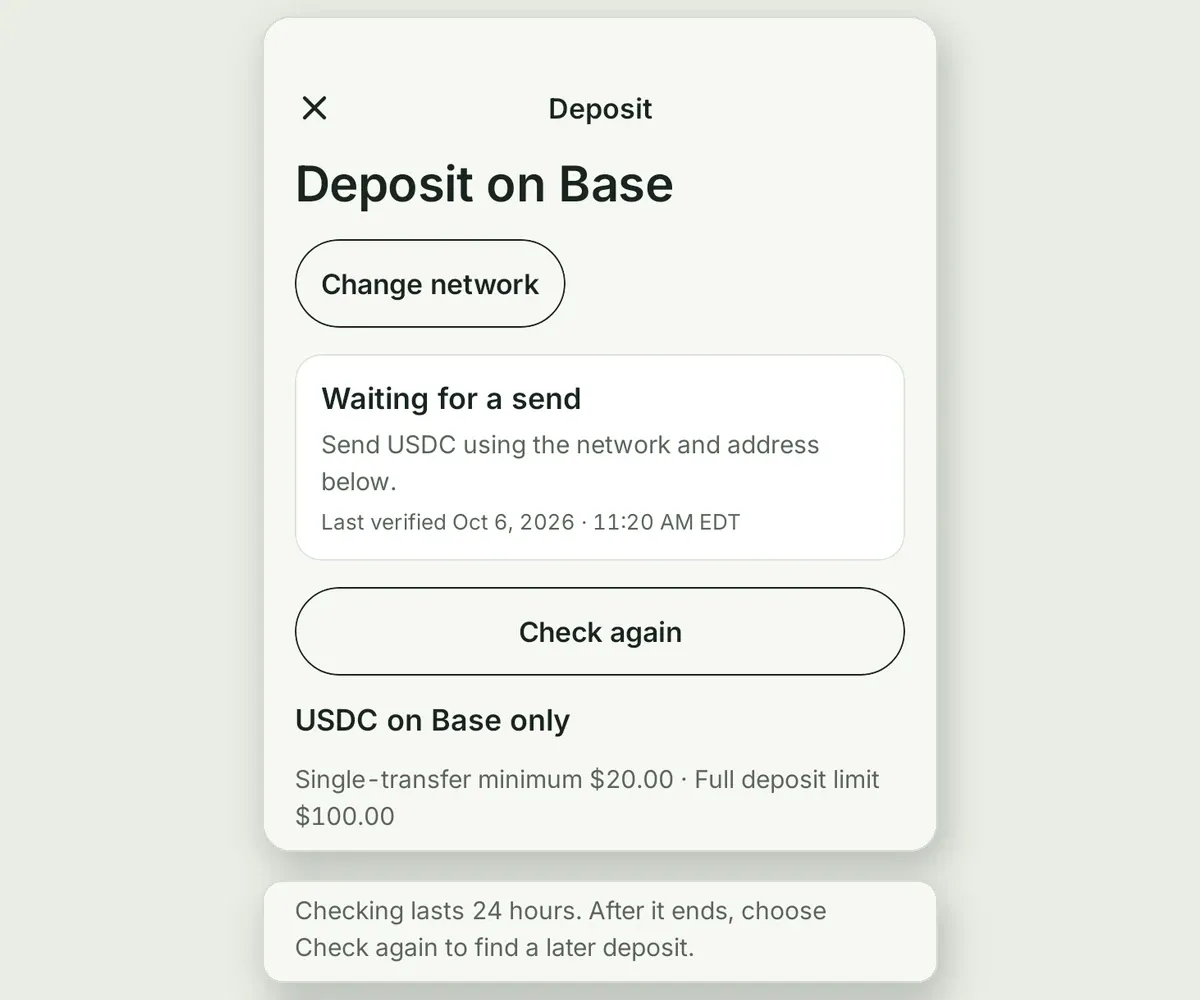
Two parts of the Folio app’s Base deposit screen. The top reads “Deposit on Base”, a card says “Waiting for a send” with the time it was last verified, then a Check again button, the line “USDC on Base only”, and “Single-transfer minimum $20.00 · Full deposit limit $100.00”. Below, the line “Checking lasts 24 hours. After it ends, choose Check again to find a later deposit.”
The Base deposit screen after Prepare deposit, rendered from the app’s code. The address and QR code sit between these two parts.

This is CCTP, Circle’s Cross-Chain Transfer Protocol. Nothing is wrapped and no pool sits in between. Your wallet burns the USDC on Base, Circle attests the burn, and the same amount is minted to your Solana account.

What you see when it waits

Listen along
What the Base and Arc rows show while Folio's signer is set upAfter sign-in the phone adds Folio's signer. While it does, the Base and Arc rows read Setting up and can't be chosen. Once Folio confirms the signer they are Ready and can be chosen. If setup didn't finish they read "Briefly unavailable. Check back soon." and the app tries again.Signed inphone adds Folio's signerSETTING UPThe Base and Arc rows read "Setting up"and can't be chosen yet.confirmeddidn't finishREADYBase and Arc canbe chosen.UNAVAILABLE"Briefly unavailable.Check back soon."The app tries again.
What the Base and Arc rows show while the signer is set up.

Folio checks a few conditions before every sweep. If one isn’t met, the deposit waits and the app tells you why in one sentence:

When The app says
Base and Arc aren’t open for your account “Deposits from Base and Arc aren’t open for this account yet.”
Folio’s signer is missing “Briefly unavailable. Check back soon.”
A signing request didn’t finish “We couldn’t finish preparing your deposit. Try again in a moment.”
A Folio spending limit is reached “Received. Arriving later than usual.”
Deposits on that chain are paused “Base deposits are paused right now.”

A waiting deposit isn’t lost. Folio keeps track of it, reuses the transaction it already prepared, and carries on once the condition clears.

If Folio’s signer ever disappears from your wallet, Folio notices at the next setup check or when Privy refuses to sign. It holds Base and Arc deposits, alerts its team, and your phone adds the signer again under your sign-in.

Solana doesn’t need one

Listen along

Your Solana wallet has no Folio signer. The trades and transfers you start in Folio are signed on your phone, and Folio’s server signs only as the fee payer, so the network fee is on Folio. The deposit signer exists because money can arrive on Base or Arc while you aren’t there to sign.

The short version

Listen along
  • Your keys stay in Privy’s enclave, and your Privy sign-in owns your wallets.
  • Your phone adds Folio as a signer on your Base and Arc wallet.
  • Privy lets that signer sign two calls, both ending in your own Solana account, and refuses everything else.

Send it on Base or Arc. Find it in Funding.

Investing involves risk, including loss of the money you invest.

Updated 14 October 2026: Folio’s signer is added when you choose to set up Base or Arc deposits, not at sign-in.

Frequently asked questions

Does Folio hold the private keys to my Folio wallets?
No. Privy keeps your wallets' private keys inside its secure enclave, and your wallets are owned by your Privy account. Folio is added to your Base and Arc wallet as an extra signer with a narrow policy. Folio's app and server never receive a wallet's private key.
What can Folio sign on my Base or Arc wallet?
Two calls. A USDC approval for Circle's CCTP messenger, and a depositForBurn on that messenger whose recipient is your own Solana USDC account, with a maximum fee of zero and standard finality. Privy refuses any other transaction from Folio's signer before it signs.
Can Folio send my USDC to someone else?
Not through its signer. The policy on Folio's signer fixes the burn's recipient to your own Solana USDC account and allows no other call, so Privy will not sign a transfer to another address, a burn to another account, or a burn that pays a fee. The policy is administered with Folio's Privy app credentials, and the signing key on its own cannot change it.
Do I need to keep the Folio app open while a Base or Arc deposit moves?
No. Open Deposit, choose Base or Arc and tap Prepare deposit. Folio then watches your address for 24 hours. Once your USDC arrives, the move to Solana runs on Folio's server, and your phone can be closed or off.
Does Folio sign my Solana transactions?
No. The trades and transfers you start in Folio are signed on your phone. Folio's server adds its own signature only as the fee payer, so the network fee comes from Folio.
All posts

Public beta

You're on the list.